

Discover the latest improvements to help you make the most of Queue-it. This quarter brings our new Visitor MCP Server for AI agents, smarter Traffic Access Rules, real-time traffic quality insights, more flexible Visitor Experience tools, and easier platform administration.
It's been a big few months at Queue-it. We launched AI-powered bot detection with Netacea, a native Queue-it behavior in Akamai Property Manager, a Shopify Connector, and a new Visitor MCP Server for AI agents.
And alongside those launches, we’ve shipped meaningful improvements across the platform.
For our Bots & Abuse features, these include expanding Traffic Access Rules flexibility, rolling out the new Queue-it CAPTCHA, and increasing visibility into traffic quality for Hype Event Protection.
Improvements to our Visitor Experience features include a new Creative user role, updates to the AI Custom Theme Generator, and expanded customization options in Visitor Engagement.
On the platform admin side, we’ve expanded the number of API keys available and improved the process for waiting room data exports.
Table of contents
- In case you missed it: Queue-it's latest launches
- Visitor MCP Server: A foundation for orchestrating agentic traffic
- Updates to Queue-it’s Bots & Abuse offerings
- Updates to Queue-it’s Visitor Experience offerings
- Platform & admin updates: More API keys & easier data exports
We've already covered our larger launches in detail on our blog. But in case you missed them, here’s a quick recap, with links to learn more:
- Shopify Connector: Shopify merchants can now use Queue-it for hyped drops with the new connector and checkout validation, which stops visitors from bypassing the waiting room through direct cart or checkout paths. Read the launch blog.
- Akamai Visitor Prioritization Powered by Queue-it: Akamai customers can now add Queue-it as a native Property Manager behavior. With this new integration, Queue-it builds, runs, and updates the EdgeWorker for you. Read the launch blog.
- Bots & Abuse Premium Powered by Netacea: Netacea's AI-powered bot detection is now available natively within Queue-it. Netacea signals strengthen your Visitor Reputation score and power a new Live Summary view of genuine demand. Read the launch blog.
- Visitor Engagement: Turn your waiting room into an interactive brand experience with polls, quizzes, and email sign-ups. Read the launch blog.
AI agents are already browsing and buying online. They bring speed, scale, and endless patience to high-demand sales. They also bring new questions: who's behind them, what's their intent, and how can we welcome them without putting human visitors at a disadvantage?
Queue-it’s answer to these tough questions starts with our new Visitor MCP (Model Context Protocol) Server. It gives AI agents a purpose-built way to interact with Queue-it, bringing them into the same traffic control framework as your human visitors.
Today, Queue-it’s Visitor MCP Server allows agents to understand the waiting room and receive the same wait information as human visitors. But more importantly, it provides a foundation for three capabilities we're building to help our customers successfully and fairly embrace agentic traffic:
- Control agentic traffic: Decide how AI agents access your site, so legitimate agents can take part in high-demand events without gaining an unfair advantage over human visitors.
- See and understand agentic traffic: Get a clear view of who’s accessing your site and why, from human visitors and legitimate AI agents to crawlers and malicious bots.
- Authenticate agentic traffic: Verify an agent’s identity and authority to act for a visitor, helping preserve one fair place in line per person, whether they arrive themselves or through an agent.
The Visitor MCP Server is now live for all customers, though agentic traffic will not be actively routed to it until our next round of Connector updates. To learn more or opt out, visit our Help Center article (Queue-it login required).
If you’re curious about what agentic traffic looks like on your site today or want to be among the first to test the capabilities we’re building, contact your Customer Success Manager or support@queue-it.com.
Or, if you want to see how agents, bots, and humans are moving through Queue-it's network, check out our newly launched Queue-it Flow page. Here's a sneak peek of the data.
Until recently, the same Traffic Access Rules applied whether your waiting room was idle or in the middle of a busy event. That made it hard to customize bot protection to be strict in some scenarios and lenient in others.
Two new conditions in Traffic Access Rules have changed that.
Waiting Room Type lets a rule target waiting rooms by how they're configured:
- 24/7 Peak Protected
- Scheduled
- Invite-only
- Hype Event Protection
Queue Phase lets a rule adapt to the phase of the waiting room:
- Idle
- Pre-Queue
- Queue
- Post-Queue
Together, they let your protection follow the shape of your event. For example, you can tighten controls during active queuing and relax them once traffic returns to normal. You can also apply stricter rules to Scheduled events than to a 24/7 Peak Protected waiting room.
Both new conditions combine with existing ones using Match all or Match any. That includes Visitor Reputation, so if you're using Bots & Abuse Premium Powered by Netacea, you can build rules like “challenge suspicious visitors, but only in the Pre-Queue.”
RELATED: Traffic Access Rules: Stop Bots With Precise Segmentation & Targeted Mitigation
Queue-it recently introduced a new CAPTCHA with a more secure and user-friendly icon challenge.
With the new CAPTCHA, visitors first confirm they're human with an “I'm not a robot” checkbox. Then, if additional verification is required, they're presented with an icon challenge that asks them to select icons in a specific order.

The new approach improves security, accessibility, and user experience as traditional character-based CAPTCHAs become increasingly vulnerable to automated solving.
The CAPTCHA remains fully hosted by Queue-it and GDPR compliant, and visitors challenged through Traffic Access Rules or enter-queue restrictions will see the new version automatically.
RELATED: Block Bots & Abuse With the Right CAPTCHA for You
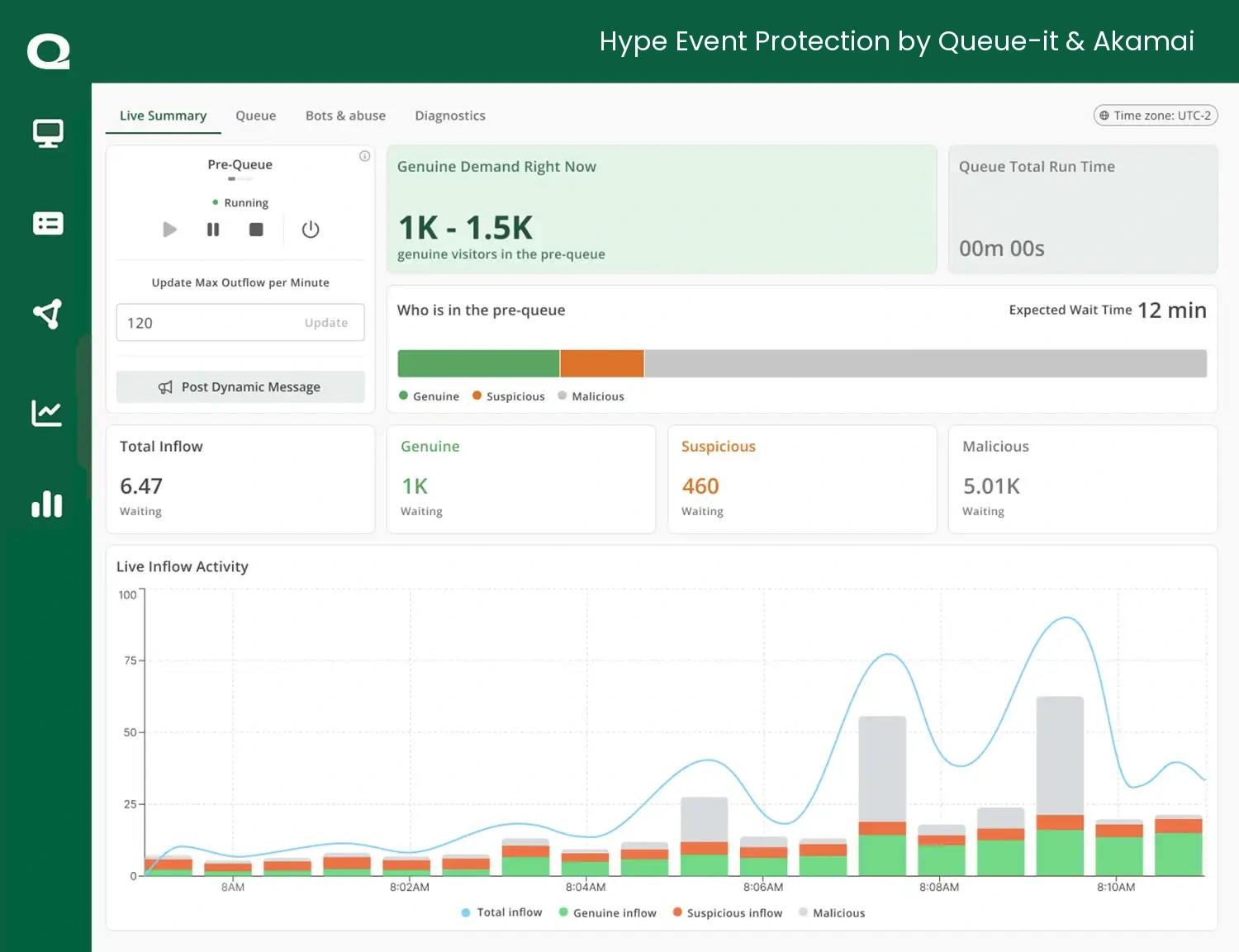
Live Summary, the real-time dashboard introduced with Bots & Abuse Premium Powered by Netacea, is now available for Hype Event Protection customers too.
You'll find it as a new tab on the Monitor page. It uses Akamai visitor classification to show how much of your demand is genuine and how that changes during an event, so you don't have to piece it together from separate screens. Live Summary shows you:
- Genuine demand right now: How many real customers are in line, plus the current expected wait time.
- Who's in the Pre-Queue: The share of genuine, suspicious, and malicious visitors waiting before your sale starts.
- Live inflow activity: Total inflow over time, broken down by traffic quality, so you can spot spikes and shifts as they happen.
Your Pre-Queue controls and Max Outflow settings stay on the same screen, so you can act on what you see without switching views.
Waiting room design often involves marketing and design teams, but giving them access to the GO Queue-it Platform has traditionally meant giving them access to sensitive settings and controls they don’t need.
The new Creative role solves that. It gives creative teams dedicated access to shape the visitor experience without access to operational controls like waiting room configuration or live traffic settings. Users with the Creative role can:
- Build and edit Custom Themes, including with the AI Custom Theme Generator.
- Create Visitor Engagement widgets to engage visitors while they wait.
- Post dynamic messages during live events to keep visitors informed.
The Creative role is available now. Simply assign the role when adding a new user to your Queue-it account.
And it’s a great time to add your creative teams to your account, as we’ve got a few exciting updates to our Visitor Experience features that they can start experimenting with today.
Since we launched the AI Custom Theme Generator late last year, teams have been using it to go from prompt to Custom Theme in seconds. But getting from a first draft to a refined theme was more challenging, so we've made three key improvements:
- The AI remembers your theme's history: When you edit an AI-generated theme, it uses your earlier prompts to understand how the theme has evolved, so each change builds on the last instead of starting over.
- You can edit more than the prompt: Swap the title, logo, reference image, or background image without regenerating from scratch.
- A more advanced AI model: The generator now runs on a more capable model, producing higher-quality themes and edits.
The result is more control and fewer iterations before a Custom Theme is ready to deploy to a live waiting room.
RELATED: Create Custom Themes Faster With Queue-it’s AI Generator
Visitor Engagement’s interactive polls and quizzes turn time in the waiting room into time with your brand. Since launch, we’ve been learning from how customers are using Visitor Engagement and where they want more flexibility. Our latest updates include:
- Video in content slides: Show a product teaser, artist message, or event trailer while visitors wait.
- Rich text formatting: Use bold, italics, lists, and line breaks so key details, like sale rules or what to have ready at checkout, stand out.
- HEX color codes: Match your brand exactly instead of picking the nearest option.
- More CTA button styling: Make your call to action look like it belongs on your site.
Alongside these improvements, we’ve also made Visitor Engagement available in “Create-only” mode to all Queue-it accounts with Custom Themes.
Even if Visitor Engagement isn’t included in your subscription, you can now explore the feature and experiment with creating widgets, polls, and other interactive experiences. Just head to Visitor Engagement under the Visitor Experience tab in the Queue-it platform.
RELATED: Visitor Engagement: Delight Visitors, Capture Data & Grow Sales During the Wait
Managing integrations and working with waiting room data just got easier, with two updates designed to remove some common friction from everyday platform tasks.
- Create up to 100 API keys per subscription: Give individual teams, tools, or partners their own named API keys instead of sharing credentials across integrations. This makes it easier to manage and securely rotate keys without disrupting other integrations, and to see exactly which key made a change in the change log.
- Export waiting room data in the background: Large or long-running exports from Statistics > Export Waiting Room Data now run in the background, so you can leave the platform without interrupting the export or worrying about timeouts. When your file is ready, you’ll receive an email with a download link valid for seven days. The export will also now remain available in the platform for 30 days.
Our R&D department is always pushing Queue-it to do more for your team: more control over traffic, a better experience for you and your customers, and more peace of mind on those high-impact days.
Next up, the team is working on:
- Agentic traffic control and insights
- Improvements to Custom Theme creation
- More flexibility with bot mitigation integrations
Keep an eye out for the next update in early 2027.