Queue-it’s Shopify Connector integrates Queue-it’s virtual waiting room with your Shopify store and adds checkout validation to help ensure protected products are purchased by shoppers with valid Queue-it access. There are two ways to set this up:
- Client-side JavaScript: Integrates Queue-it through your Shopify storefront. The simplest option for stores that don’t require API-level protection.
- Cloudflare Connector: Integrates Queue-it at the Cloudflare edge, providing API-level protection for stores using a compatible Cloudflare O2O setup.
Both options use Shopify checkout validation to confirm shoppers have passed through the required Queue-it journey before purchasing protected products.
This page provides a high-level technical overview of both setups. To prevent malicious actors from compromising the security of our customers' high-profile sales and registrations, we host our in-depth Connector documentation in private repositories. For more detailed integration guidance, connect with one of our technical experts.
The two integration options handle storefront protection differently, but follow the same overall journey: Queue-it manages access to the protected Shopify experience, while Shopify checkout validation provides a separate check before a protected purchase can continue.
- Request received: A visitor accesses a product page or protected part of your Shopify store.
- Queue-it evaluation: The chosen integration evaluates the request against your configured Queue-it rules.
- Waiting room: If the visitor needs to queue, they’re directed to the appropriate Queue-it waiting room.
- Access granted: Once it’s their turn, the shopper returns to the protected Shopify experience with valid Queue-it access.
- Shopping journey: The shopper continues through the store and adds products to their cart.
- Checkout validation: For protected products, Shopify checkout validation verifies the shopper’s Queue-it access before the purchase can continue.
- Purchase continues: Validated shoppers can continue through Shopify checkout.
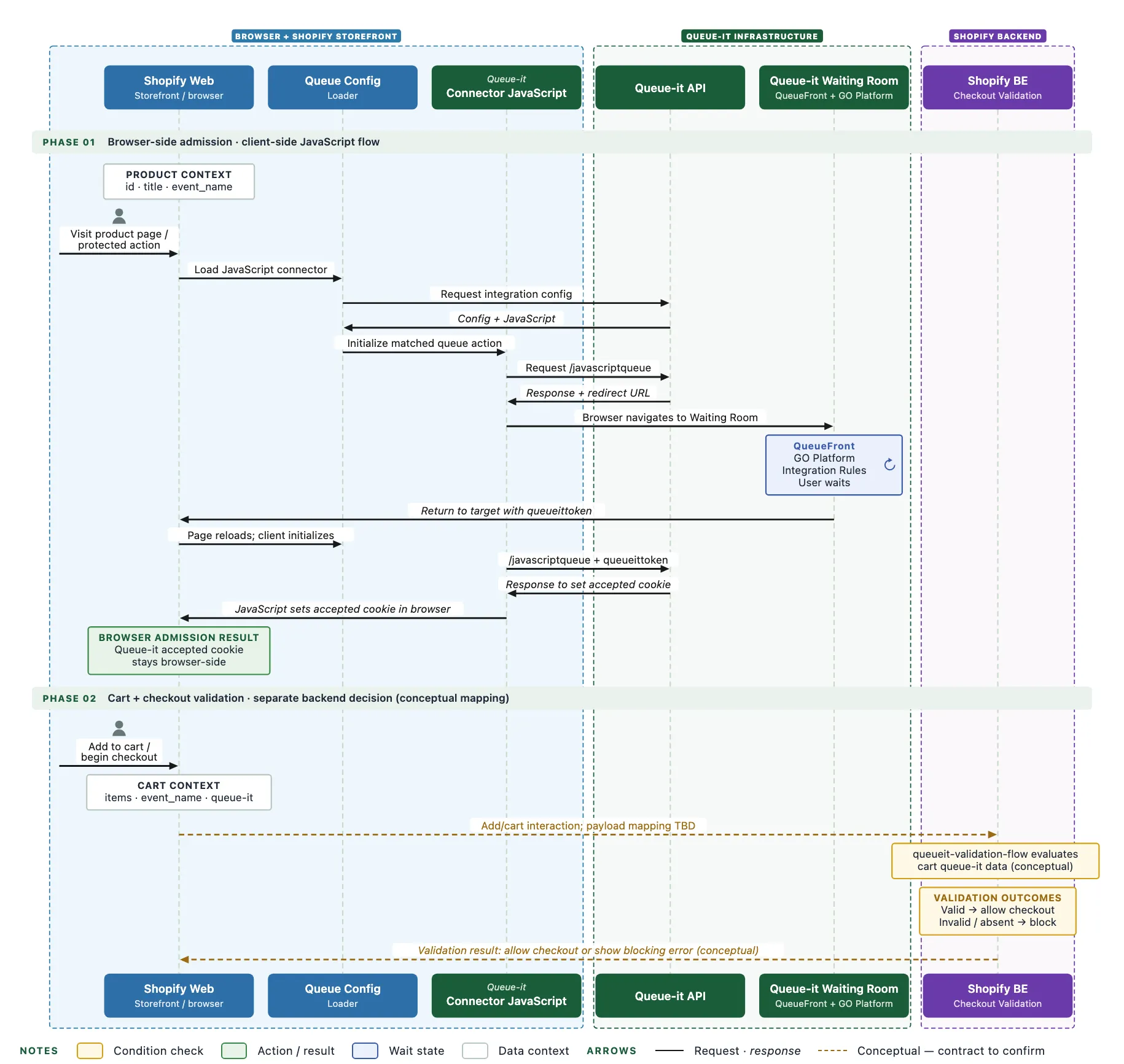
Queue-it evaluates and manages admission through the shopper’s browser, with Shopify checkout validation providing the separate backend check before purchase.
Queue-it evaluates and manages admission at the Cloudflare edge, with Shopify checkout validation providing the separate backend check before purchase.
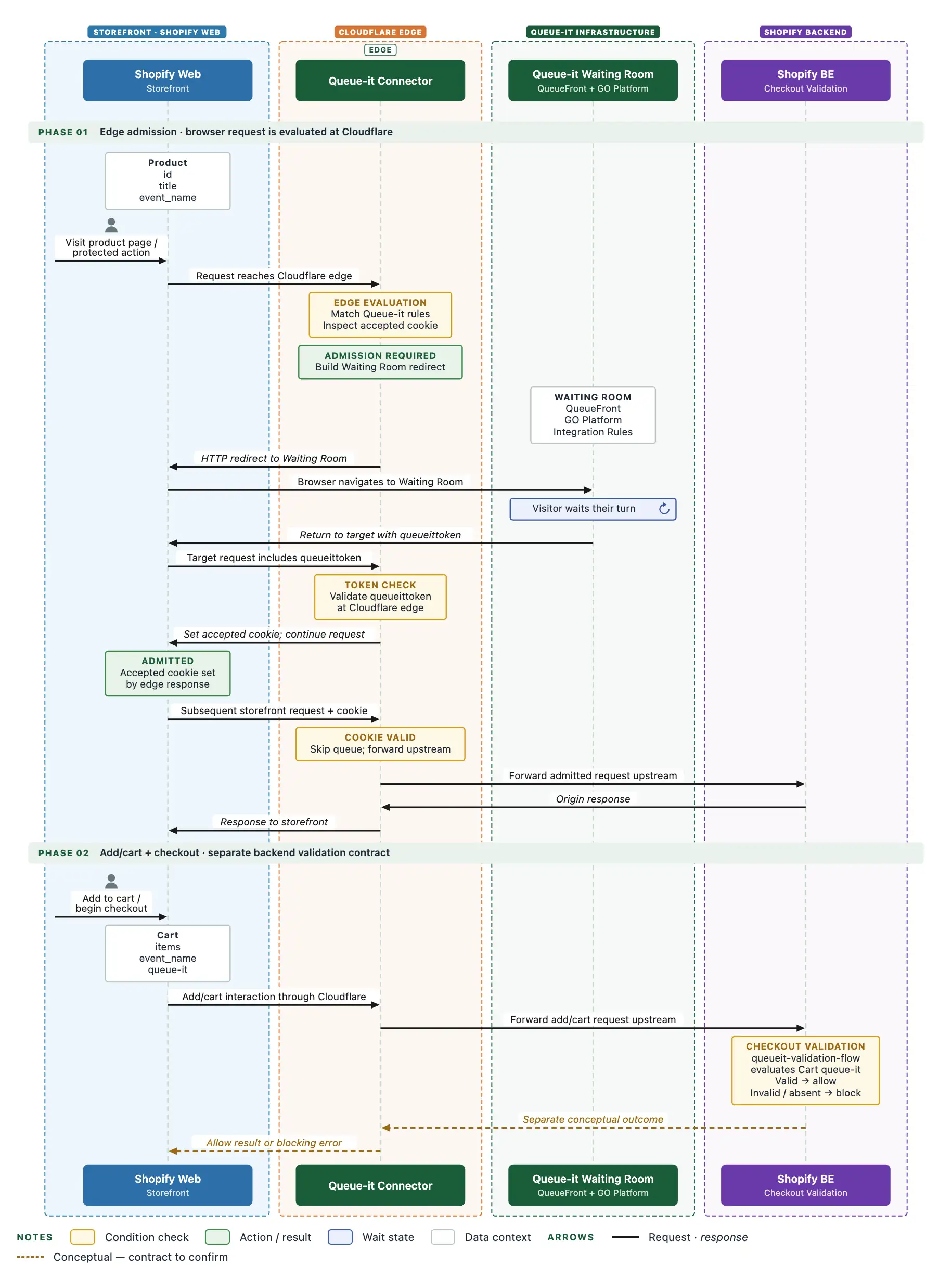
Queue-it Shopify Connector flow showing how requests are handled with the Cloudflare Edge integration.
To learn more about how Queue-it works, including waiting room types and when/where Queue-it protects your site, visit Queue-it for developers.
To integrate Queue-it with Shopify, you’ll need:
- An active Queue-it account with Queue-it admin access
- A Shopify store with administrator access
- Access to Queue-it’s private Shopify Connector repository (available on request)
- For the Cloudflare option, the required Cloudflare O2O configuration
The Shopify Connector consists of the following components:
- Queue-it storefront protection: Directs visitors to the appropriate Queue-it event when protection is active, using either client-side JavaScript or the Cloudflare Connector.
- Product configuration: Associates protected Shopify products with the relevant Queue-it events.
- Checkout validation: Verifies Queue-it access for protected products during the purchase journey.
- Queue-it integration configuration: Controls your waiting rooms, integration rules, and protection through the GO Queue-it Platform.
At a high level, setting up the Shopify Connector involves:
- Configure the required Shopify settings.
- Implement your chosen Queue-it storefront integration.
- Install and configure Shopify checkout validation.
- Associate protected products with the relevant Queue-it events.
For detailed implementation instructions, contact your Queue-it representative.
Waiting rooms and their protection are created and configured in the GO Queue-it Platform.
For each product or experience you want to protect, configure the appropriate Queue-it event and integration rules. Shopify product configuration associates protected products with the relevant event so the Connector can manage access and validate it during the purchase journey.
Queue-it can manage access to high-demand experiences across your Shopify store (see How Queue-it Works). The exact level of storefront protection depends on your chosen integration method.
With the client-side JavaScript Connector, Queue-it can manage the storefront experience, while Shopify checkout validation prevents a protected product from being purchased without valid Queue-it access. The client-side approach does not itself protect direct add-to-cart API calls.
With the Cloudflare Connector, protection is applied at the Cloudflare edge and supports API-level protection, with Shopify checkout validation extending enforcement through the purchase journey.
Both approaches let you apply Queue-it to selected high-demand products and experiences for limited releases, product drops, flash sales, and other periods of concentrated demand.